Overview
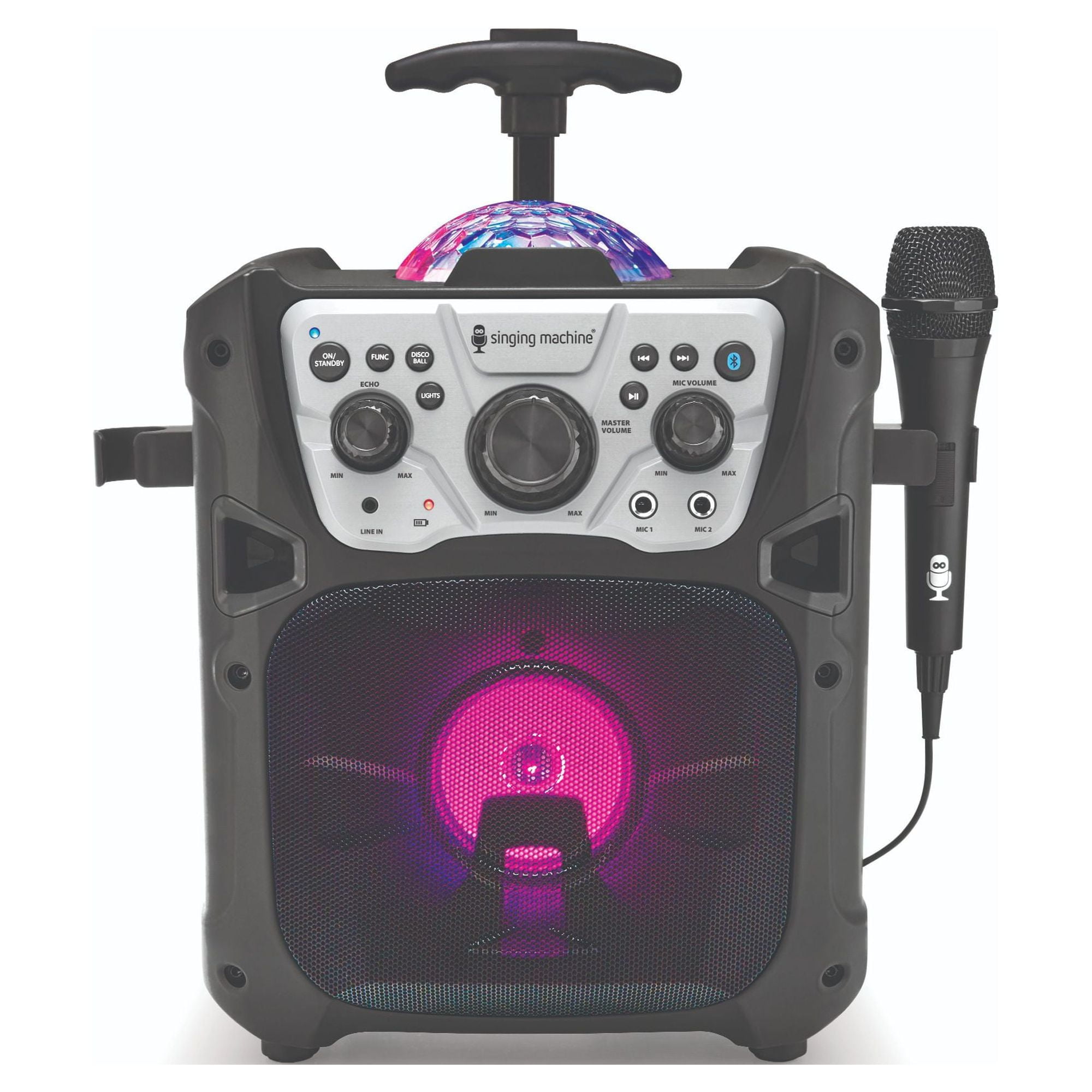
SML640 is a portable karaoke speaker that works with the Singing Machine mobile app. It supports Bluetooth audio streaming, Line-In, built-in rechargeable battery operation, and USB charging for compatible devices.
Key features
- Preferred karaoke experience through the Singing Machine mobile app
- Bluetooth audio streaming
- Line-In (3.5 mm) input for connecting an external audio device
- Microphone inputs for singing
- Built-in rechargeable lithium-ion battery
- USB charging port for compatible phones and tablets
- Built-in speaker and disco light effects
What’s in the box
- Singing Machine karaoke unit
- AC adapter
- Wired microphone
- User manual
Using the Singing Machine app
Stream karaoke directly to your machine
The Singing Machine app is the recommended way to access thousands of karaoke songs. Pair the app to your machine and stream high-quality karaoke videos with on-screen lyrics.
What you get with the app:
- 100,000+ songs — Access a massive karaoke catalog with new songs added every Friday
- High-quality videos — Engaging karaoke videos that keep the party going, or choose lyrics-only mode to save bandwidth
- Optional lead vocals — Toggle lead vocals on or off to sing solo or get vocal support
- DJ mode — Queue up to 100 songs and control the playlist from your device
- Easy pairing — Quick wireless connection between your device and karaoke machine
Getting started:
- Open the Singing Machine Karaoke app on your phone or tablet.
- Power on your karaoke machine.
- Connect your device to the karaoke machine via Bluetooth.
- Choose a song in the app and start singing.
Subscription options:
Purchase an in-app subscription to unlock unlimited access to the full catalog. Certain plans include a 30-day free trial.
Connecting via Bluetooth
You can use Bluetooth to connect your phone or tablet to the karaoke machine for audio.
Pairing steps
- Turn on the karaoke machine.
- Put the karaoke machine in Bluetooth pairing mode.
- On your phone or tablet, open Settings and select Bluetooth.
- Turn Bluetooth On.
- Look for your karaoke machine in the list of available devices. The name may show as FIESTA GO.
- Tap the device name to pair.
- If prompted for a PIN, try 0000.
If you do not see the machine in the Bluetooth list
- Turn Bluetooth off and back on on your phone or tablet.
- Turn the karaoke machine off, wait 10 seconds, then turn it back on.
- If the machine is already paired to another nearby device, disconnect it on that device and try again.
- Keep your Bluetooth device within approximately 30 feet / 10 meters of the karaoke machine.
If pairing succeeds but you still do not hear sound
- Turn up the volume on both the karaoke machine and your phone or tablet.
- Make sure your phone or tablet is using the karaoke machine as the audio output device.
- Disconnect the Bluetooth connection, then reconnect.
Using Line-In
You can connect another audio device, such as a phone, tablet, or laptop, to the karaoke machine using a 3.5 mm audio cable.
Setup steps
- Turn on the karaoke machine.
- Plug the audio cable into the karaoke machine’s LINE IN jack.
- Plug the other end into your external device’s headphone or audio-out port.
- Select Line-In mode on the karaoke machine.
- Set the external device volume to about one-third to start, then adjust as needed.
Using the rechargeable battery
The SML640 includes a built-in rechargeable lithium-ion battery, allowing you to use the machine without keeping it connected to AC power.
- Battery: Lithium-ion 7.4V, 2500mAh
- Approximate charging time: Up to 12 hours
- Approximate operating time: Up to 5 hours, depending on usage
Connect the included AC adapter to recharge the battery.
Using the USB charging port
The USB port can be used to charge compatible external devices such as phones or tablets.
USB charging output: Up to 5V / 1.0A
The USB port is intended for device charging and is not used for music playback.
Using the light effects
The SML640 includes built-in speaker and disco light effects.
Depending on the selected light mode, the lights can react to the music, operate continuously, or be turned off.
Troubleshooting
No power
- Make sure the karaoke machine is turned on.
- Confirm the power cord is connected securely.
- Try a different wall outlet.
- If the battery is empty, connect the unit to AC power and allow it to recharge.
No sound
- Turn up the Master Volume.
- Make sure the correct mode is selected, such as Bluetooth or Line-In.
No sound from the microphone
- Make sure the microphone is firmly connected to MIC 1 or MIC 2.
- Make sure the microphone ON/OFF switch is set to ON.
- Turn up the Mic Volume.
- Turn up the Master Volume.
Bluetooth will not pair or connect
- Turn off other nearby Bluetooth devices to avoid accidental pairing.
- Make sure Bluetooth is turned on for your phone or tablet.
- Put the karaoke machine into pairing mode, then try again.
Bluetooth is connected but you cannot hear music
- Make sure your phone or tablet supports Bluetooth audio (A2DP).
- Turn up the volume on your phone or tablet.
- Make sure the music app is open and playing.
The machine goes into standby by itself
- This model may enter standby after about 20 minutes with no audio playing.
- Press the power button to turn it back on.
Missing or broken parts
The box should include a wired microphone and an AC adapter. If either part is missing or damaged, here is the best way to resolve the issue:
Microphones
If a microphone is missing, contact our team with the original receipt and we will be happy to help.
If your microphone is broken, you can purchase a replacement from our online store:
AC adapter
If the AC adapter was missing from the box or is damaged, you can purchase a compatible replacement from an electronics retailer.
Important: If you choose to use a replacement adapter, make sure it meets the following requirements:
- Input: AC 100-240V ~ 50/60Hz
- Output: DC 9V
- Current: 1.5A
When searching online, a term like "9V 1.5A power adapter" may help you find compatible options. Make sure the connector also matches your original adapter before use.
Specifications
| SML640 | |
|---|---|
| Output Power | 8W (RMS) |
| Bluetooth Version | Bluetooth V5.0 |
| Bluetooth Range | Up to 30 feet / 10 meters (open space) |
| Microphone Jack | 6.3 mm |
| Line In | 3.5 mm Line-In Jack |
| Power Input | AC 100-240V ~ 50/60Hz |
| Adapter Output | DC 9V, 1.5A |
| Battery | Lithium-ion 7.4V, 2500mAh |
| USB Charging Output | 5V / 1.0A |
| Dimensions | 13.4 x 10.9 x 10.7 inches / 34 x 27.6 x 27.1 cm |
| Weight | 8.9 lbs / 4.05 kg |
| Microphone | -74 dB, 600 Ohm Impedance with 6.3 mm Dynamic Microphone |
Downloads and resources
Still need help? Contact Singing Machine support: Get help quickly via our chat bot by clicking the chat bubble in the bottom-right of our help page, or submit a request here .