Overview
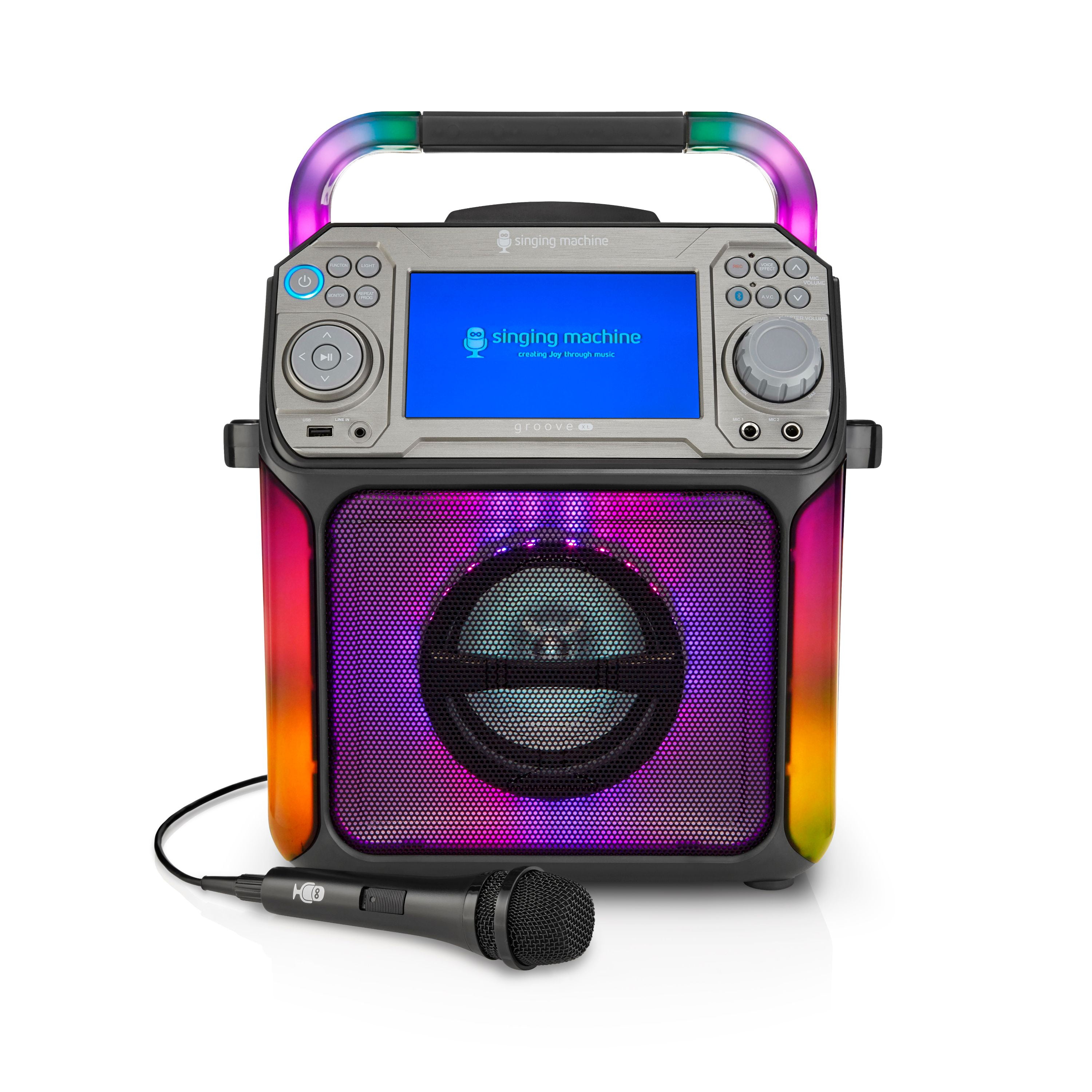 STVG782BK or STVG785W is a karaoke system that supports karaoke playback from a CD+G disc. It also supports Bluetooth.
The preferred way to use this model is with the Singing Machine mobile app.
Key features
- Plays CD+G (karaoke discs)
- Plays karaoke files from USB (MP3+G)
- Bluetooth audio playback
- Connects to a TV for lyrics (A/V output)
- Microphone inputs
What’s in the box
- Karaoke machine
- Microphone(s)
- Power adapter
Getting started
- Connect the unit to power.
- Optional: connect to a TV using A/V outputs to display lyrics.
- Plug in microphone(s).
- Choose a source:
- CD/CD+G
- USB
- Bluetooth
Using the Singing Machine app
Stream karaoke directly to your machine
The Singing Machine app is the recommended way to access thousands of karaoke songs. Pair the app to your machine and stream high-quality karaoke videos with on-screen lyrics.
What you get with the app:
- 100,000+ songs — Access a massive karaoke catalog with new songs added every Friday
- High-quality videos — Engaging karaoke videos that keep the party going, or choose lyrics-only mode to save bandwidth
- Optional lead vocals — Toggle lead vocals on or off to sing solo or get vocal support
- DJ mode — Queue up to 100 songs and control the playlist from your device
- Easy pairing — Quick wireless connection between your device and karaoke machine
Getting started:
- Download the Singing Machine Karaoke app on your smartphone or tablet
- Create an account and register your machine
- Pair the app to your karaoke machine via Bluetooth
- Browse the catalog, select songs, and start singing
Subscription options:
Purchase an in-app subscription to unlock unlimited access to the full catalog. Certain plans include a 30-day free trial.
Download the app:
Available for iOS and Android devices. Visit singingmachine.com/pages/download-the-app to get started.
Troubleshooting
Bluetooth: how to connect
- Turn the machine on.
- Press the Bluetooth button, or press FUNCTION until you see BLUETOOTH on the screen.
- On your phone or tablet, open Bluetooth settings and select “Singing Machine.”
- If asked for a pairing code, enter 0000.
Bluetooth: if you can’t pair
- Turn off Bluetooth on other nearby devices to avoid accidental pairing.
- Make sure Bluetooth is turned on in your phone or tablet settings.
- Make sure the machine is in pairing mode. If needed, press the Bluetooth button again to restart pairing.
- Move your device closer to the machine (Bluetooth works best within 30 ft / 10 m in open space).
Bluetooth: paired but no sound
- Make sure your phone or tablet is using the Singing Machine as the audio output (some devices require you to choose “Use as audio device” or similar).
- Turn the volume up on both the machine and your phone or tablet.
- Start playback on your phone or tablet (your music app must be open).
Lyrics not showing on the TV
- Confirm you are using a CD+G disc or MP3+G files (regular audio CDs and MP3 files will not display lyrics).
- Check that the yellow video cable is connected from VIDEO OUT on the machine to VIDEO IN on the TV.
- Make sure the TV is set to the correct input/source (often labeled AV).
No power
- Press ON/OFF to turn the unit on.
- Make sure the AC adapter is connected securely to the back of the unit.
- Try a different wall outlet.
Machine keeps turning off
If your STVG782BK is turning off on its own, it may be the Auto Power Shutdown (APS) energy-saving feature. To turn APS off, press and hold the LIGHT button for 5 seconds. The LED lights will flash red, green, and blue once. Then restart the unit.
No sound (general)
- Turn up MASTER VOLUME.
- Press FUNCTION to confirm you selected the correct mode (CD/CD+G, USB, Bluetooth, or Line In).
- If using an external device, turn up the volume on that device.
No microphone sound
- Make sure the microphone is firmly plugged into MIC 1 or MIC 2.
- Make sure the microphone’s switch is set to ON.
- Turn up MIC VOLUME and MASTER VOLUME.
USB songs won’t play
- Confirm the files are not corrupted.
- Confirm the files are in a supported format for this model.
- Try a different USB drive if the current one is not supported.
Missing or broken parts
The box should include a wired microphone and an AC adapter. If any of these parts are missing or damaged, here is the best way to resolve the issue:
Microphones
If a microphone is missing, you can contact our team with the original receipt and we will be happy to sort this out with you.
If you broke a microphone, you can purchase a replacement from our online store:
AC adapter
If the AC adapter was missing from the box or is damaged, you can use a compatible cable you already own or purchase a replacement from an electronics retailer.
Important: If you choose to use a different cable, make sure it meets the following requirements to avoid damaging your machine:
Output: DC 12V Current: 2A minimum (higher amperage is safe) Polarity: Center Pin Positive
When searching online, a term like " 12V 2A center positive power adapter" should help you find suitable options.
Specifications
| STVG782BK | |
|---|---|
| Output Power | 15W (RMS) |
| Bluetooth Range | Up to 33 feet / 10 meters (open space) |
| Microphone Jack | 6.3mm (1) |
| Line In | 3.5mm Stereo Headphone Jack (1) |
| Power | DC 12V, 2A |
| Dimensions | 13 x 9.1 x 17.04 inches / 33 x 23 x 43.1 cm |
| Weight | 8.7 lbs / 4 kg |
| Microphone | -74db 600 Ohm Impedance with 6.3 mm Dynamic Microphone |
Downloads and resources
Still need help? Contact Singing Machine support: • Get help quickly via our chat bot, click on the chat bubble in the bottom-right of our help page. • Send us an email by submitting a request here or clicking the link at the top-right of our help page.