This article applies to Singing Machine models SML678BK (Black) and SML678P (Pink).
Overview
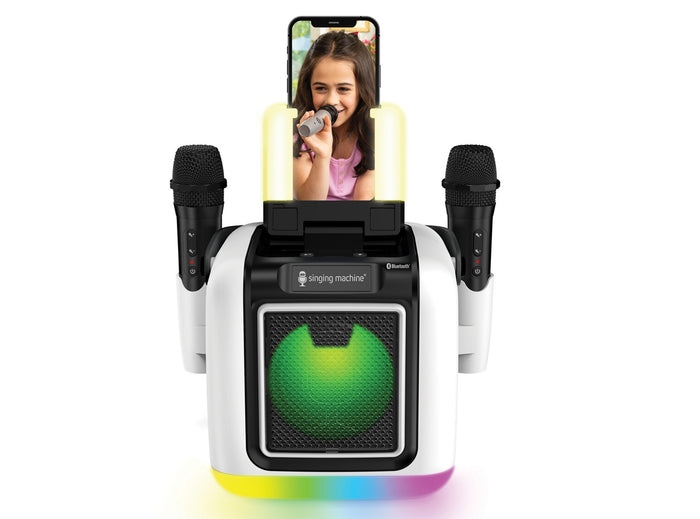
The SML678 is a portable rechargeable karaoke speaker with two wireless microphones, Bluetooth audio streaming, a built-in selfie light, and a smartphone holder for recording performances.
Key features
- Bluetooth 5.0 audio streaming
- Rechargeable battery with approximately 4 hours of use, depending on settings
- Two wireless microphones (AA batteries required)
- Six voice effects: Echo, Female, Male, Chipmunk, Robot, and Radio
- Vocal Off function for compatible songs
- Built-in selfie light and smartphone holder
- Colorful speaker lighting
- 3.5 mm AUX IN and two optional wired microphone inputs
What’s in the box
- SML678 karaoke unit
- Two wireless microphones
- USB Type-C power adapter
- User manual
Getting started
Charging the rechargeable battery
The built-in lithium battery is not user-serviceable. Charge the unit at least once a month to help maintain battery life.
- Connect the included USB Type-C power adapter to the charging port on the back of the unit.
- Connect the adapter to a wall outlet.
- Allow approximately 4 hours for a full charge.
- Disconnect the charger when charging is complete.
- Fast-flashing indicator: low battery
- Slow-flashing indicator: charging
- Indicator off: fully charged
Note: If the battery is fully depleted, allow at least 10 minutes of charging before trying to power on.
Turning on the machine
- Open the cover.
- Press the On/Standby button to turn on the unit.
- Press and hold the button to turn the unit off.
Using the wireless microphones
- Unscrew the bottom of each microphone.
- Insert two AA (LR6) batteries, following the polarity markings.
- Close the battery compartment and turn on the karaoke machine.
- Press the power button on each microphone and wait for it to connect.
- Adjust microphone volume with the controls on the microphone or machine.
The wireless microphone range is approximately 30 feet (10 meters) in open space. The wireless connection turns off after approximately 20 minutes without audio input.
Connecting via Bluetooth
- Turn on the SML678.
- Press the Bluetooth/VOCALS OFF button to select Bluetooth mode.
- On your phone or tablet, open Bluetooth settings.
- Select SINGING MACHINE from the available devices.
- Wait for the confirmation sound and solid Bluetooth indicator.
If asked for a PIN, enter 0000. To pair a different device, press and hold the Bluetooth/VOCALS OFF button to restart pairing mode.
Connecting via Line-In (AUX)
- Connect a 3.5 mm audio cable (not included) to your external device.
- Connect the other end to the SML678 AUX IN jack.
- Start playback and adjust the volume on both devices.
Note: AUX IN takes priority over Bluetooth. Start with the external device volume at approximately one-third to avoid distortion.
Using the Singing Machine app
The Singing Machine Karaoke app powered by Stingray lets you browse and play karaoke tracks with lyrics on your phone or tablet. The SML678 plays the audio through Bluetooth.
- Download the app on a compatible iOS or Android device.
- Open the app and create an account or sign in.
- Pair your device with the SML678 through Bluetooth.
- Choose a song and adjust the music and microphone volumes.
Subscription options
Subscription plans unlock access to the full karaoke catalog. Plan availability and free trial offers may vary.
Download the Singing Machine Karaoke app
Voice effects and lighting
Press the Voice Effects button to cycle through Echo, Female, Male, Chipmunk, Robot, and Radio. Press the Bluetooth/VOCALS OFF button during Bluetooth playback to reduce lead vocals where supported. Results depend on the song.
Press the lights control to cycle through music-synchronized lighting, programmed effects, and lights off.
Using the selfie light and smartphone holder
- Open the cover and secure your phone vertically or horizontally in the holders.
- Open your phone’s camera or recording app.
- Press the Selfie Light Control button to choose a lighting option.
- Record your performance on your phone.
Note: Photos and videos are saved on your smartphone, not the karaoke machine.
Troubleshooting
Machine will not power on
- Confirm the battery has sufficient charge.
- Connect the USB-C adapter and allow at least 10 minutes of charging if the battery is depleted.
- Try a different wall outlet and check that the cable is firmly connected.
Machine will not charge
- Check the USB-C connection and power outlet.
- Allow approximately 4 hours for a full charge.
- Do not open the unit or attempt to replace its internal battery.
No sound or distorted sound
- Increase the music volume on the machine and your connected device.
- Check Bluetooth pairing or the AUX cable connection.
- If using AUX, reduce the external device volume and raise it gradually.
No sound from wireless microphones
- Confirm each microphone is turned on.
- Replace both AA batteries if low.
- Raise microphone volume and move within approximately 30 feet (10 meters) of the unit.
Bluetooth will not pair or keeps disconnecting
- Make sure the SML678 is in Bluetooth mode.
- Disconnect other devices that may already be paired.
- Press and hold Bluetooth/VOCALS OFF to restart pairing mode.
- Forget SINGING MACHINE in your device settings and pair again.
- Check that no AUX cable is connected.
Bluetooth connected but music will not play
- Confirm music is playing on your phone or tablet.
- Check that media audio is routed to SINGING MACHINE.
- Increase the volume on both devices.
- Remove any AUX cable, which takes priority over Bluetooth.
Machine turns off unexpectedly
- The unit may enter standby after approximately 20 minutes without audio playback.
- Press On/Standby to resume.
- If it shuts off during playback, recharge the battery.
Selfie light is not working
- Confirm the machine is powered on.
- Press the Selfie Light Control button to cycle through lighting options.
- Charge the battery if needed.
Resetting the SML678
The manual identifies a reset access point inside the AUX IN jack. If the unit becomes unresponsive, contact Customer Support if you are unsure how to use this feature. Do not force an object into the jack or disassemble the machine.
Missing or broken parts
The box should include two wireless microphones and a USB Type-C power adapter. If anything is missing, contact Customer Support with proof of purchase.
Wireless microphones
If a microphone is missing or damaged, contact Customer Support with your model number and purchase details to review available options.
USB-C power adapter
Use a compatible USB Type-C adapter rated 5V DC, 3A. Do not use an adapter with an incompatible output voltage.
Internal battery
The built-in rechargeable battery is not user-replaceable. Contact Customer Support if it no longer holds a charge.
Specifications
| Feature | SML678 |
|---|---|
| Models | SML678BK (Black) / SML678P (Pink) |
| Audio output | 10W RMS |
| Bluetooth | 5.0 |
| Bluetooth range | Up to 30 ft / 10 m in open space |
| Wireless microphones | Two included; 2.4 GHz |
| Microphone batteries | 2 AA batteries per microphone |
| Wired microphone inputs | Two 6.3 mm jacks |
| AUX IN | 3.5 mm stereo |
| Charging | USB Type-C, 5V DC / 3A |
| Charging time | Approximately 4 hours |
| Runtime | Approximately 4 hours, depending on usage |
| Dimensions | 7.8 × 7.8 × 9.7 in / 19.8 × 19.8 × 24.6 cm |
Downloads and resources
Still need help?
- Chat with us using the chat bubble on our Help Center.
- Submit a support request and include model SML678 and your issue details.